Payments & taxes · for tenants
MTA eco-contribution return (Malta)
Download your quarterly Malta eco-contribution return in the official MTA booking template (.xlsx), check the totals per licence and submit and pay on time.
Malta's eco-contribution is collected by you from your guests and declared to the Malta Tourism Authority (MTA) every quarter. The Eco return tab prepares the declaration from your bookings and fills the official MTA booking template for you.
What counts #
- Every booking with a check-in date inside the quarter belongs to that quarter.
- Every guest aged 18 or over pays per night, up to the cap (see Tourist taxes).
- Waived contributions are still due to the MTA — they appear in the return and are shown as absorbed by you.
- Cancelled bookings are excluded.
- Quarters without any booking still need a nil return.
1. Open the quarter #
Open Eco return and choose the quarter at the top. The deadline card shows when the quarter opens for submission and how many days are left. The deadline is the 15th day of the second month after the quarter ends (moved to the next Monday when it falls on a weekend).
2. Check the summary #
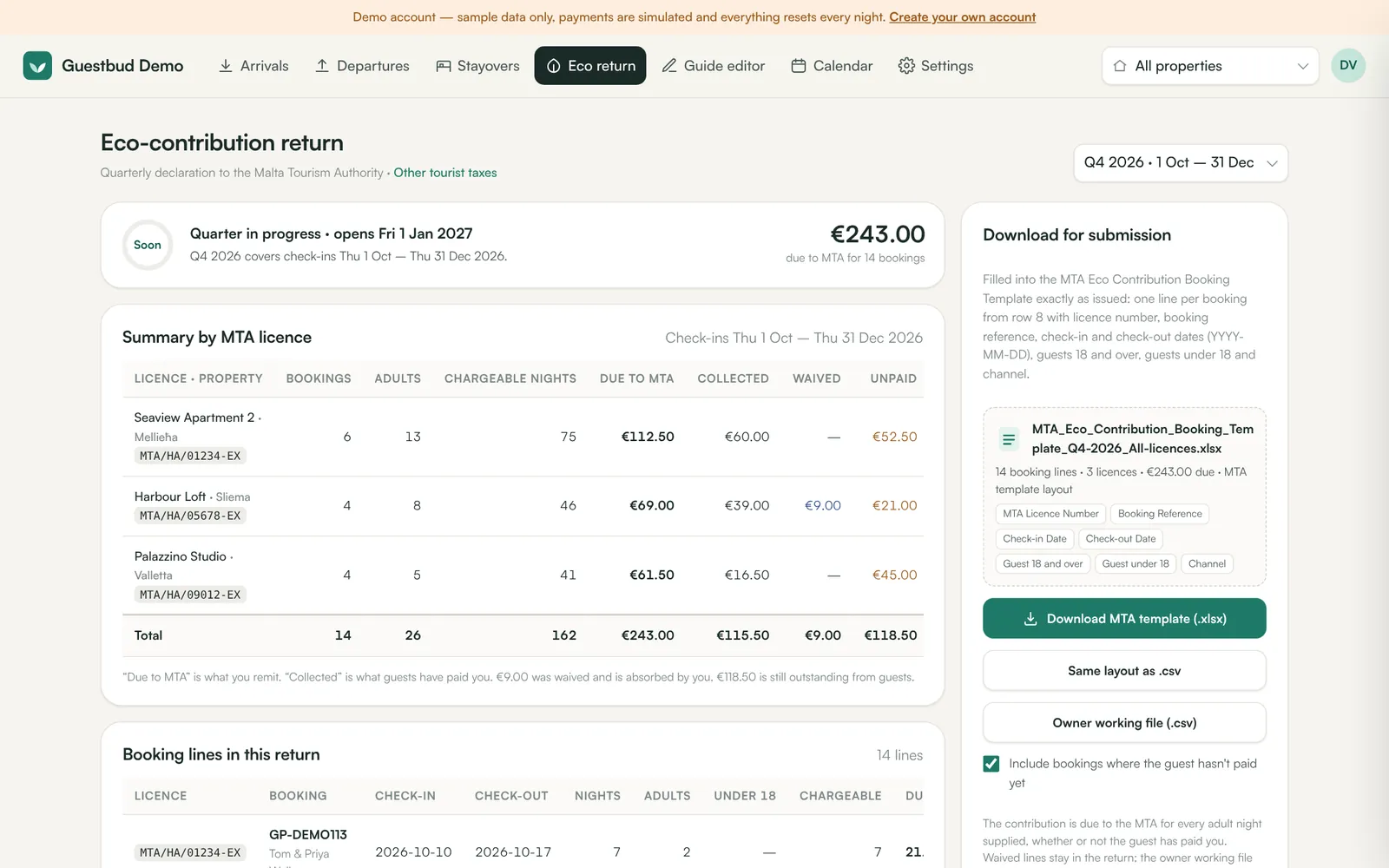
Summary by MTA licence lists each licence with bookings, adults, chargeable nights, the amount due to the MTA, what guests paid you, what was waived and what is still unpaid. Click a booking line to open it and fix anything (for example the number of adults).
3. Download the template #
- Download MTA template (.xlsx) — the official MTA Eco Contribution Booking Template, filled from row 8: licence number, booking reference, check-in and check-out (YYYY-MM-DD), guests 18+, guests under 18 and channel.
- Same layout as .csv — the same columns as CSV.
- Owner working file (.csv) — your own reconciliation with collected, absorbed and outstanding amounts.
Untick Include bookings where the guest hasn't paid yet only if you want to see what was actually collected; the MTA return itself covers every adult night supplied.
4. Submit and pay #
Upload the template in the MTA's online system and pay the total due before the deadline. Keep the downloaded file with your records together with ID evidence for exempt under-18s.
Frequently asked questions #
A guest checked in on 30 June and left on 3 July — which quarter? #
The quarter of the check-in date (Q2) — and the rate valid on the check-in date.
Can I correct a booking after downloading? #
Yes. Fix the booking and download again; the file is generated fresh each time.
Where do I find the official MTA information? #
On the MTA's environmental contribution page.