Operators · for operators
Operator guide — installation on Windows / IIS
Install the platform on Windows with IIS and iisnode: data folder outside the web root, registry settings, first superadmin, HTTPS, backups and updates.
This guide is for the company running the platform. Hosts (tenants) don't need it.
Requirements #
- Windows Server 2019 or newer with IIS, the URL Rewrite module and iisnode
- Node.js 18 LTS or newer (no npm packages are needed — the app has zero runtime dependencies)
- The IIS SMTP service (or any mail server that reads a pickup directory) for outgoing email
- win-acme (
wacs.exe) for automatic Let's Encrypt certificates - Ports 80 and 443 open
1. Copy the application #
Copy the application folder (with server.js, web.config, lib, routes, client, docs, install, tools) to the server, for example C:\GuestPortal. This folder becomes the IIS site root.
2. Run the installer #
Double-click install\install.bat. It asks for the data folder, site name, host name, mail pickup directory and win-acme path, requests administrator rights and runs install.ps1. Or, in an elevated PowerShell:
powershell -ExecutionPolicy Bypass -File C:\GuestPortal\install\install.ps1 `
  -DataDir C:\GuestPortalData -SiteName GuestPortal -HostName portal.example.com -CreateSite `
  -MailPickupDir C:\inetpub\mailroot\Pickup -WacsPath C:\Tools\win-acme\wacs.exe
The installer:
- checks Node.js, iisnode and URL Rewrite,
- creates the data folder outside the web folder and restricts it to SYSTEM, Administrators and the app pool,
- writes
HKLM\SOFTWARE\Aloaha\GuestPortalwithDataDir,SiteName,MailPickupDirandWacsPath— in both the 64-bit and the 32-bit registry view (HKLM\SOFTWARE\WOW6432Node\Aloaha\GuestPortal), so 32-bit and 64-bit Node builds find it, - creates the app pool and site (with
-CreateSite), - builds the public assets (HTML without comments, minified JavaScript and CSS),
- registers the scheduled task GuestPortal ACME worker (SYSTEM, every minute).
3. Data folder layout #
C:\GuestPortalData\
  platform\     config, superadmins, tenant index, domain map, token/order indexes, enquiries
  tenants\t_…\  one folder per tenant: settings, users, properties, bookings, customers, logs, private files
  acme\         certificate queue, results, worker heartbeat
  deleted\      archived tenants
Every JSON file is written atomically and keeps 10 rolling backups (.bak1 … .bak10); a damaged file is restored automatically from the newest good backup. For daily encrypted backups (by email and to a second folder) and a standby server that stays in sync, see Backups and high availability.
4. Create the first superadmin #
Open http://<your host>/admin/setup. The one-time setup token is in C:\GuestPortalData\platform\setup-token.txt. Choose a username and a strong password. The token file is deleted afterwards.
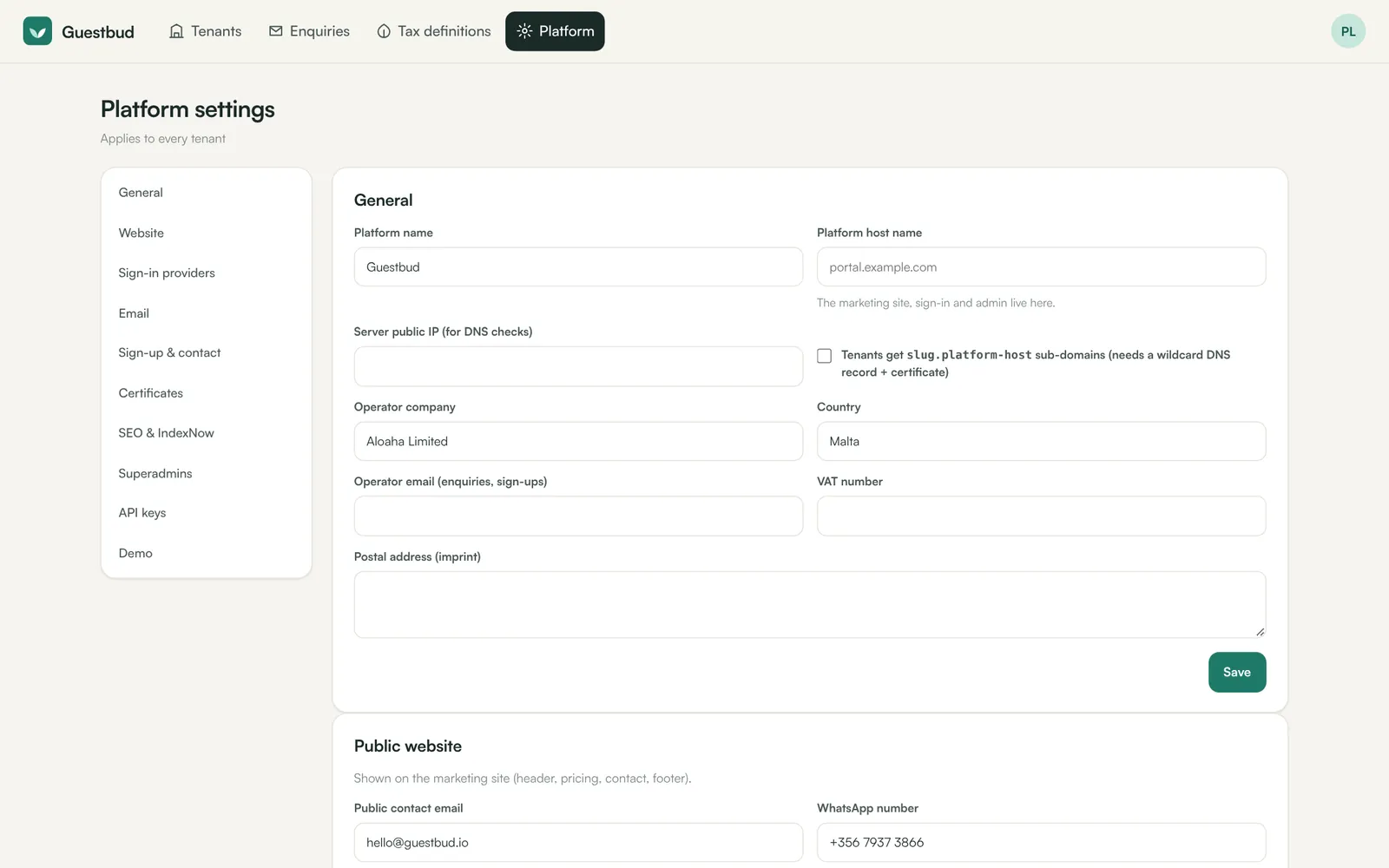
5. Platform settings #
In /admin → Platform:
- General — platform name, platform host name, server IP (for DNS checks), operator details for the imprint.
- Sign-in providers — Google and phone.codeb.io client IDs and secrets. Register the redirect URI shown there with both providers. phone.codeb.io also enables EUDI Wallet check-in for guests.
- Email — pickup directory (empty = registry value, then
C:\inetpub\mailroot\Pickup), default sender. Send a test email. Make sure SPF/DKIM allow the sender domains. - Sign-up & contact — self sign-up on/off, approval, notification addresses.
- Certificates — Let's Encrypt account email, automatic mode, staging for tests.
- SEO & IndexNow — submissions on change and daily; optional Google Search Console.
6. HTTPS for the platform host #
Request the certificate for the platform host under Platform → Certificates (or bind an existing certificate in IIS). Once HTTPS works, plain HTTP requests are redirected automatically.
Updating #
Copy the new files over the application folder (the data folder is untouched) and run deploy.ps1 in it. It rebuilds the assets and recycles the app.
Frequently asked questions #
Where are the logs? #
iisnode writes stdout/stderr to C:\GuestPortal\iisnode. Per-tenant audit trails are in each tenant folder (audit.jsonl), mail and webhook logs in the dashboard.
Can it run without IIS? #
Yes, for development: set GP_DATA_DIR=C:\dev\data and node server.js (port 8080). On Linux/macOS GP_DATA_DIR replaces the registry.