Payments & taxes · for tenants
Connect Revolut payments (incl. sandbox and test cards)
Connect your Revolut Business merchant account: sandbox keys and test cards, webhook, payment methods, deposits as hold or charge, then go live.
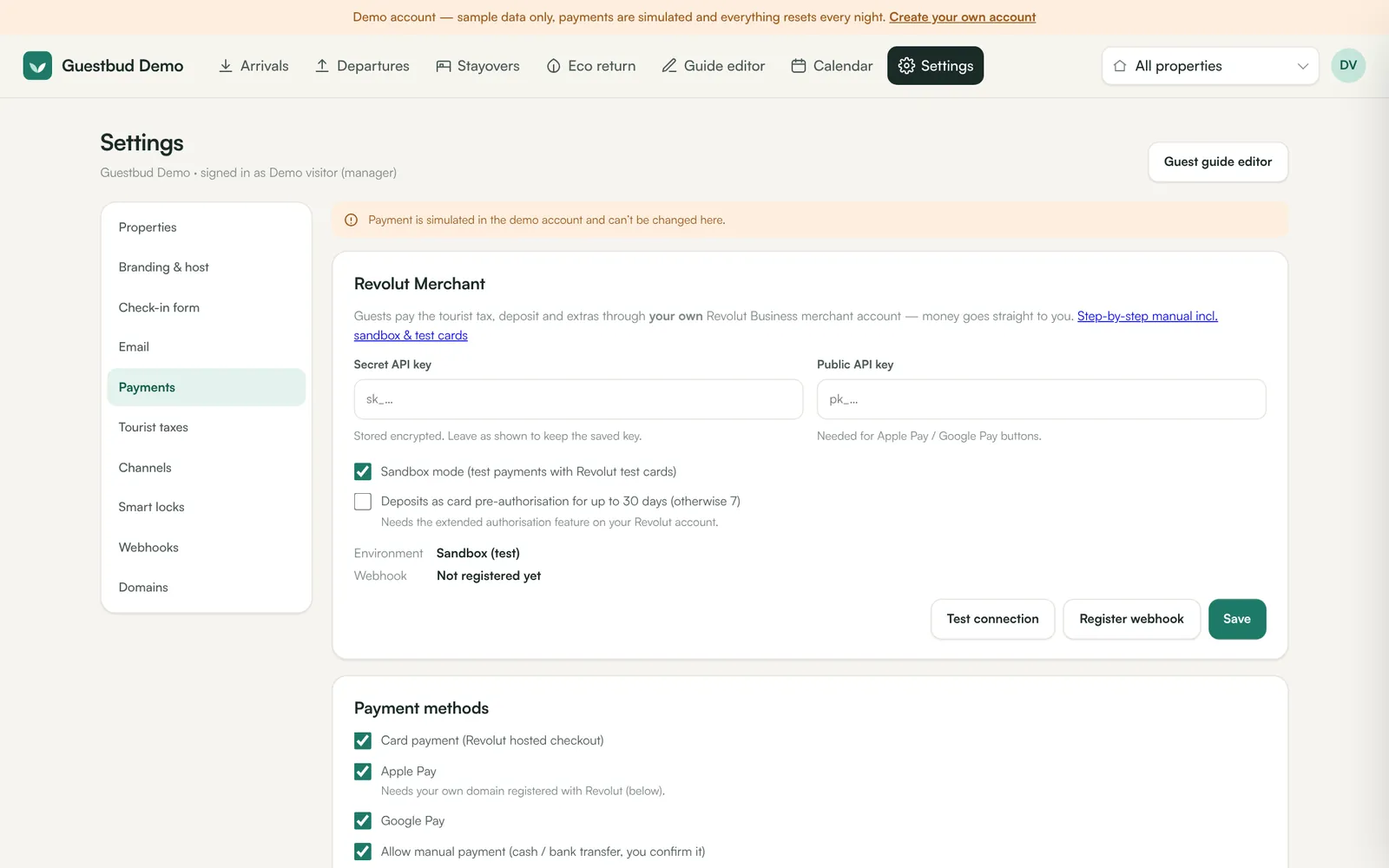
Guests pay the tourist tax, the security deposit and extras through your own Revolut Business merchant account. Money goes straight to you; we never hold it. You need a Revolut Business account with the Merchant product (card acceptance) enabled.
We strongly recommend connecting the sandbox first. The sandbox is a separate test copy of Revolut Business: no real money moves, and you can try every outcome with test cards.
1. Create a Revolut sandbox account #
- Go to
https://sandbox-business.revolut.com/signupand register. - If you are unsure which legal business type to choose, pick Public Limited Company (freelancer accounts are not supported in the sandbox).
- When asked to verify your email, click Skip email verification. For the confirmation code click Autofill code. Sandbox approvals are automatic.
2. Copy the sandbox API keys #
- Sign in at
https://sandbox-business.revolut.com/signin. - Open Merchant, click the ⋯ menu and choose Merchant API (direct link:
https://sandbox-business.revolut.com/settings/apis?tab=merchant-api). - Click Generate next to the Secret key if none exists yet, then copy it (starts with
sk_). - Copy the Public key too (starts with
pk_). It is needed for the Apple Pay and Google Pay buttons.
3. Enter the keys in your dashboard #
- Open Settings → Payments.
- Paste the Secret API key and the Public API key.
- Tick Sandbox mode (test payments with Revolut test cards).
- Click Save, then Test connection. You should see Connected to Revolut (sandbox).
- Click Register webhook. Revolut now tells your portal instantly when a payment succeeds, fails or a deposit hold is captured or released. The status changes to Registered.
The secret key is stored encrypted. When you come back later it is shown masked — leave it as it is to keep the saved key.
4. Test with the Revolut test cards #
Create a test booking with your own email address, open the guest link and pay. In the sandbox use any future expiry date and any 3-digit CVV.
| Card number | Brand | Result |
|---|---|---|
4929 4205 7359 5709 | Visa | Payment succeeds |
5281 4388 0180 4148 | Mastercard | Payment succeeds |
4929 5736 3812 5985 | — | Declined: insufficient funds |
4532 3367 4387 4205 | — | Declined: expired card |
2720 9988 3777 9594 | — | Declined: do not honour (issuer) |
4242 4242 4242 4242 | — | 3-D Secure challenge fails (only for amounts of €30.00 or more) |
5215 6741 1512 7070 | — | Fails: issuer needs additional verification |
2223 0000 1047 9399 | — | Stays in processing (authorisation started) |
Amounts below €30.00 (or £25.00) are exempt from 3-D Secure in the sandbox and succeed without a challenge. To see a 3-D Secure failure, use a test booking with a deposit of at least €30.
Check in the dashboard that:
- the tourist tax shows Paid and the deposit Held (pre-authorisation) or Paid (charge mode),
- the guest portal unlocks once all steps are done,
- a receipt email arrives,
- Release deposit on the booking refunds or releases the hold.
5. Go live #
- In your live Revolut Business account (
https://business.revolut.com) open Merchant → ⋯ → Merchant API and copy the live secret and public keys. - In Settings → Payments paste them, untick Sandbox mode, Save and Test connection (live).
- Click Register webhook again — the live account needs its own webhook.
- Make one small real payment with your own card and refund it in Revolut.
Payment methods #
Under Payment methods choose what guests are offered:
- Card payment — Revolut hosted checkout (all major cards, 3-D Secure).
- Apple Pay and Google Pay — see Apple Pay and Google Pay.
- Manual payment — for cash or bank transfer; you confirm it with Mark as paid on the booking. Add instructions such as your IBAN.
Deposits: hold or charge #
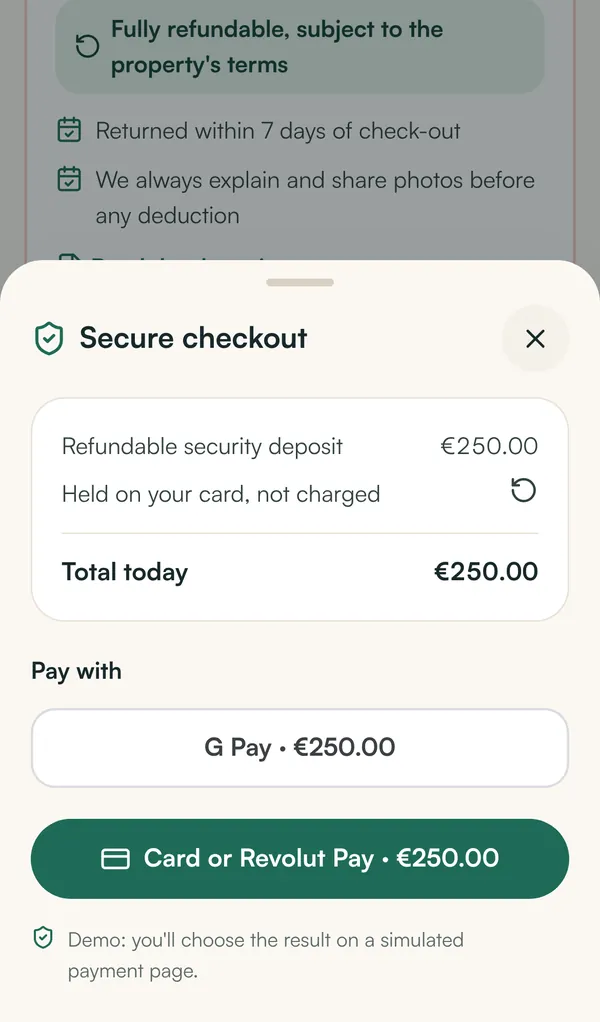
A deposit can be a card pre-authorisation (the money is reserved but not taken; released after check-out) or a charge that you refund later. Holds expire after 7 days by default; tick Deposits as card pre-authorisation for up to 30 days if your Revolut account has extended authorisations. Details: Deposits and waivers.
Troubleshooting #
Test connection says Revolut rejected the key (401)? #
You probably pasted a live key in sandbox mode or the other way round, or copied the public key into the secret field. The secret key starts with sk_.
The guest paid but the booking still says waiting for bank? #
The webhook is missing or points to an old address. Click Register webhook again. The portal also re-checks open payments whenever the guest opens the page.
Can I use one Revolut account for several companies? #
Every tenant connects its own merchant account. If you manage properties for several owners under one company, one account is fine.
Are card details stored by the guest portal? #
No. Card details are entered on Revolut's pages or in Revolut's payment sheet and never reach our servers.