




News Malta Budget 2027 announced an eco tax of €10 per adult per night for short lets (capped at €80 per person) from 1 January 2027 — not yet law. Read more
Guestbud

For short-term rental owners and managers

Guest payments and online check-in for short-term rentals.

Guestbud combines online check-in, tourist-tax collection, refundable security deposits and a digital guest guide. The tax and the deposit are separate payment steps — the deposit can be a card hold that reserves funds without an immediate charge — and access details unlock once every step is done.

  • Separate payment steps
  • Access details after check-in and payment
  • No cookies, no tracking
  • €10 per listing per month
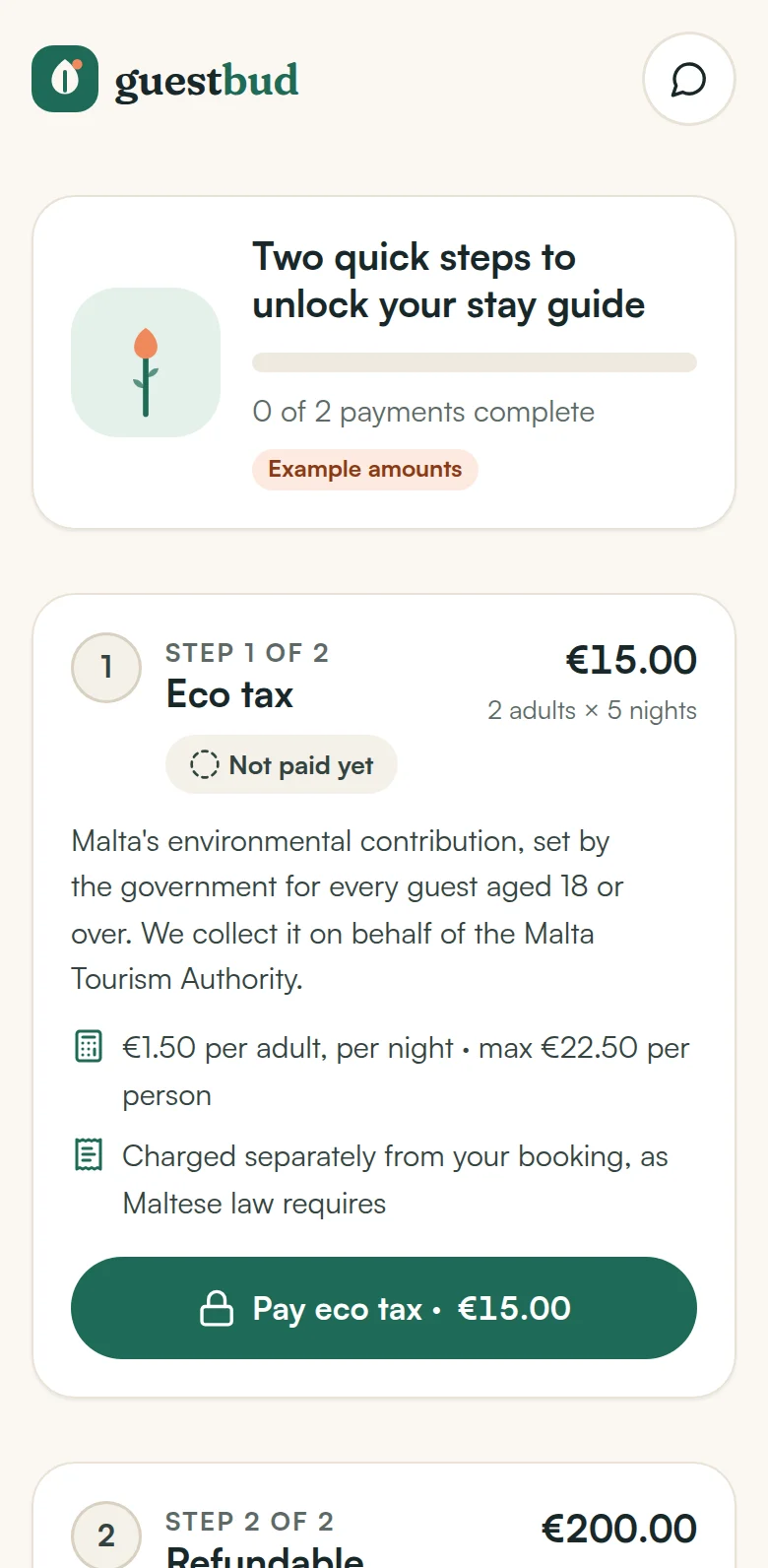
Guest portal on a phone: eco tax and security deposit as two separate payment steps
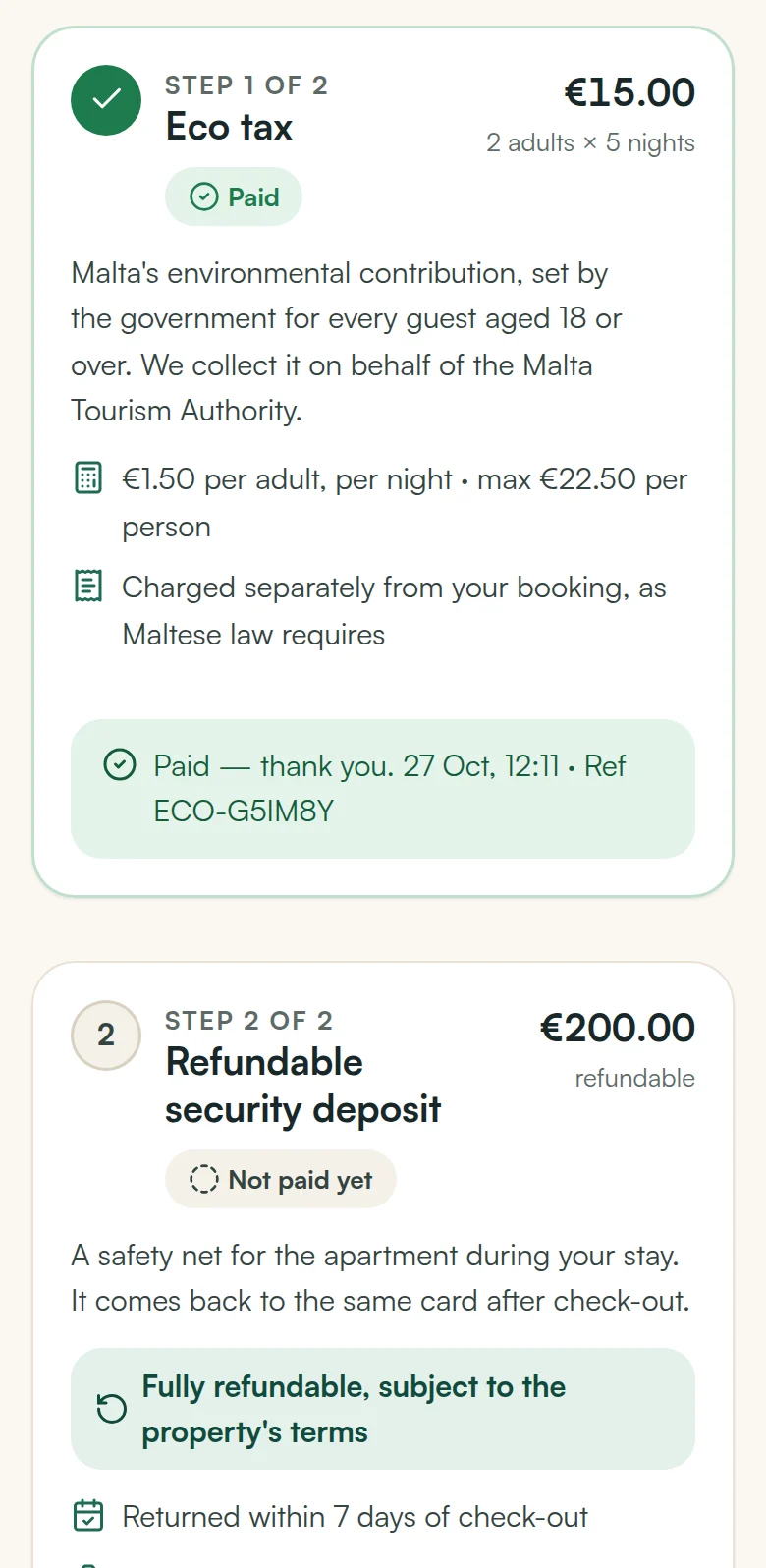
Guest portal after the eco tax is paid, deposit still open
Eco tax · €15.00Paid · ref ECO-G5MBY
Security deposit · €200.00Separate step · card hold or payment

Example amounts from the demo portal

  • Separate guest paymentsEco tax and deposit are never bundled
  • Access details after paymentCodes appear once everything is confirmed
  • Owner-friendly reportingStatements and MTA-format downloads
  • Simple per-listing pricing€10 per listing per month

How Guestbud works

Four steps from booking to a smooth arrival

Your guest receives a personal link. Everything else happens in the portal, in this order.

  1. 1

    The guest opens their portal

    A personal link shows their reservation and what needs to happen before arrival: a short online check-in, or a few taps with the EU Digital Identity Wallet.

  2. 2

    They complete separate payment steps

    First the eco tax, then the refundable security deposit. Each is its own step with its own receipt. Depending on the property, the deposit is a card hold (reserved, not charged, then released) or a payment that is refunded after check-out.

    Step 1 of 2Eco tax€15.00 examplePaid
    Step 2 of 2Refundable security deposit€200.00 exampleCard hold or payment
  3. 3

    Stay details unlock

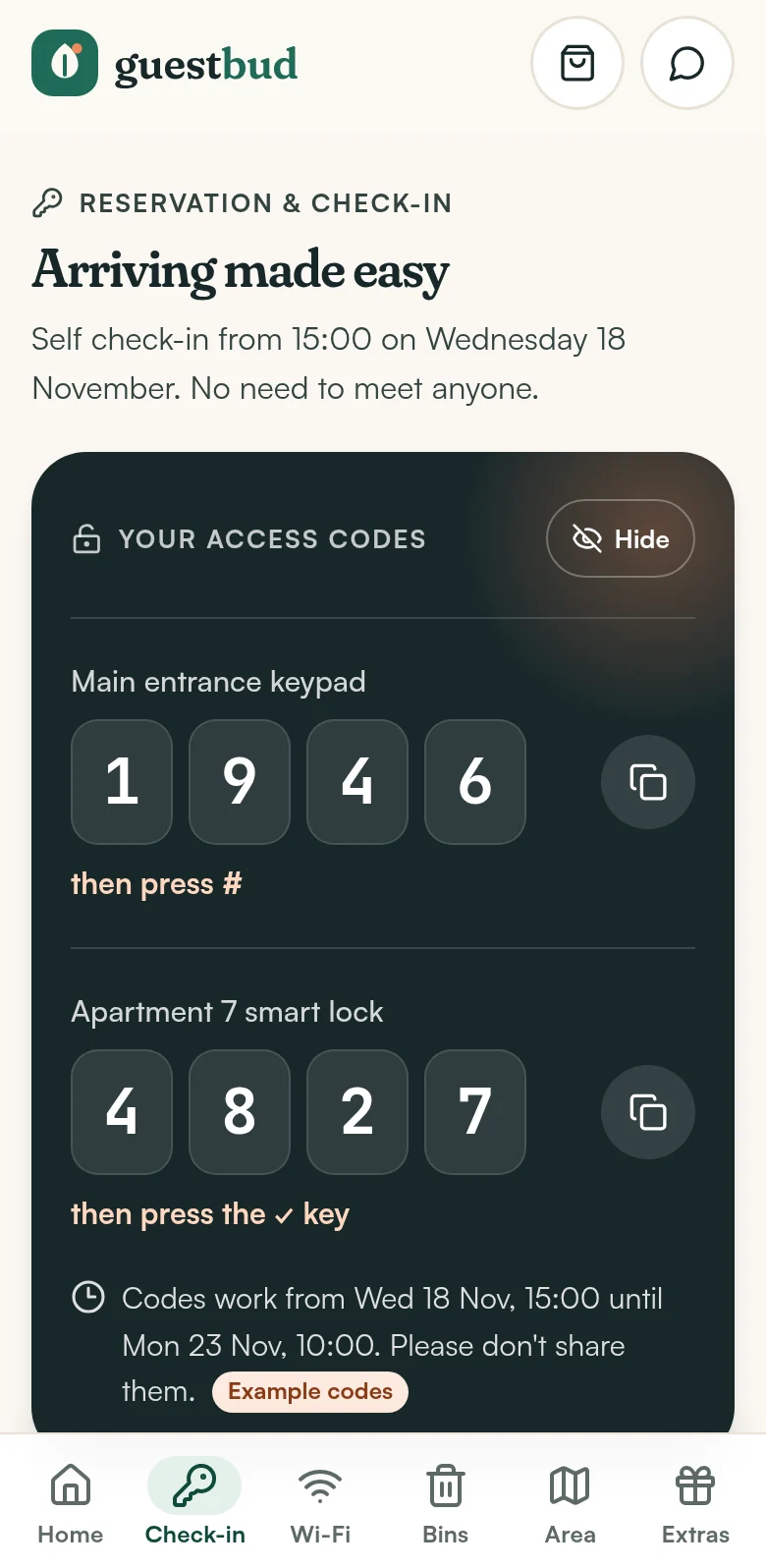
    When the check-in is complete and each payment step is settled — paid, held, paid in cash or waived by you, and skipped when the amount is zero — the guest sees their access codes, arrival steps and reservation details.

  4. 4

    Everything for the stay, in one place

    Wi-Fi, rubbish collection, local tips and optional extras such as hampers live in the same portal, which guests can keep on their home screen.

The guest experience

What guests see once every step is complete

A calm, mobile-first guide with the practical things guests actually look for, instead of a long email they can't find on arrival day.

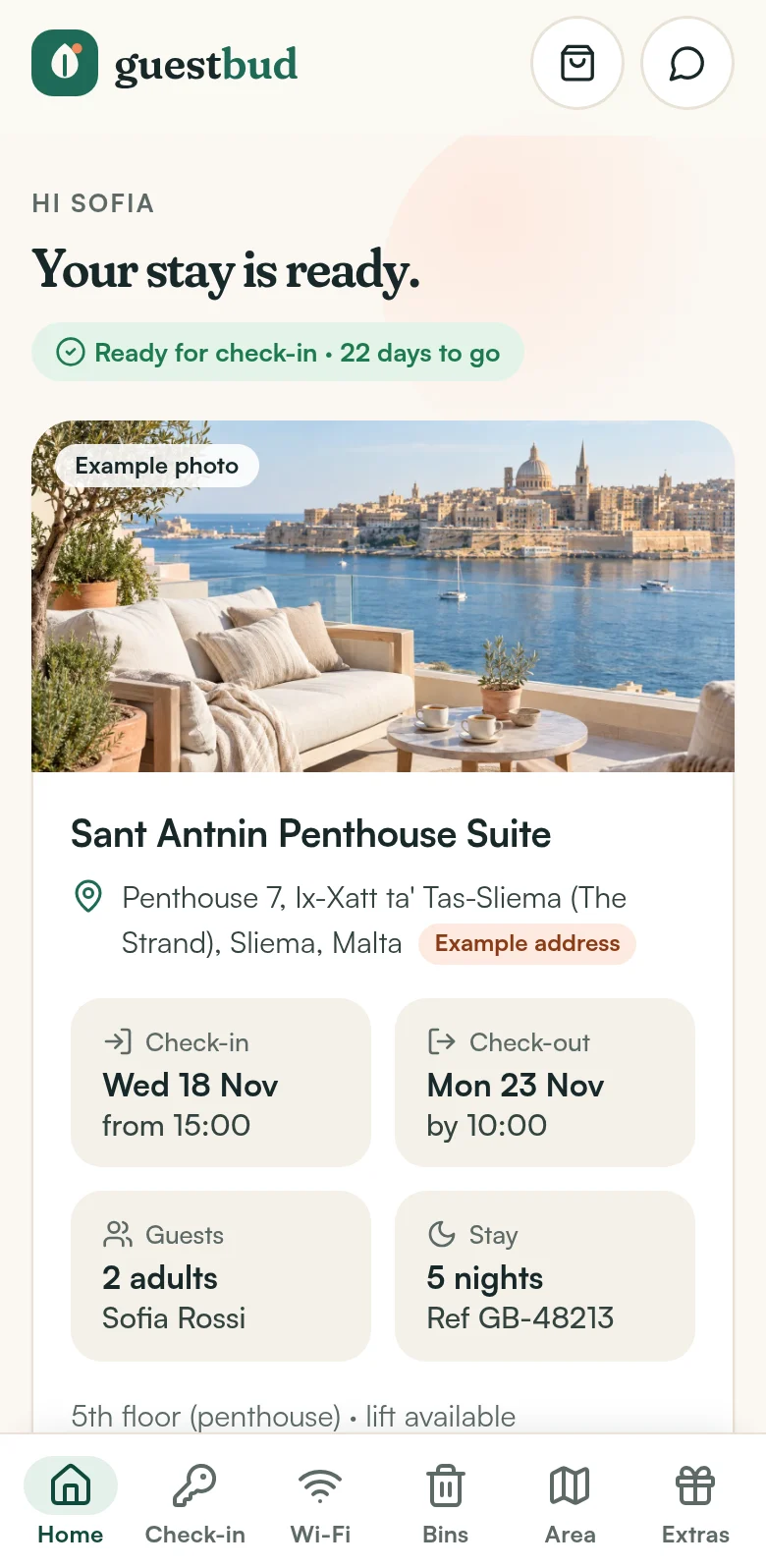
  • Reservation detailsDates, guests, booking reference and host contact
  • Property access codesDoor and building codes with step-by-step entry instructions
  • Wi-Fi informationNetwork, password and a scan-to-join code
  • Rubbish collectionWhich bag goes out on which day, and where to leave it
  • About the areaHost picks for food, beaches and getting around
  • Hampers and optional extrasStay add-ons the guest can browse and order
  • An app on their phoneAdd the guide to the home screen on iPhone or Android, no app store needed
Try the guest portal demo
Stay guide: access codes and arrival steps
Stay guide home screen with the reservation
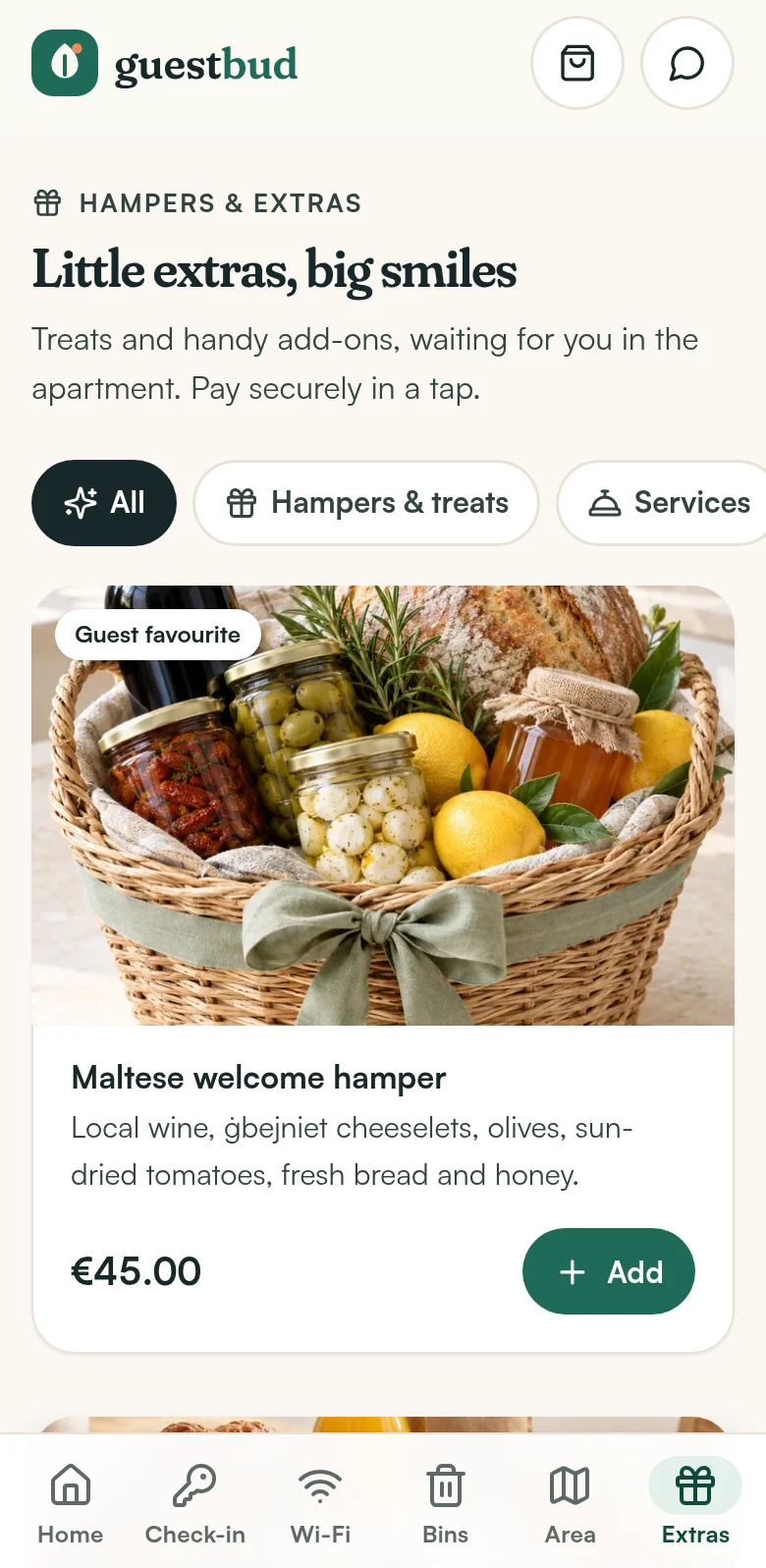
Hampers and extras to order in the guest portal
Maltese welcome hamper with local wine, cheeselets and bread
Welcome hamper
Breakfast hamper with pastries, fruit and coffee
Breakfast hamper
Bottle of Maltese wine with two glasses
Local wine
Celebration set with sparkling wine and flowers
Celebration set
Beach towels and a bag ready for the day
Beach kit

Owner tools

A simple dashboard for every listing

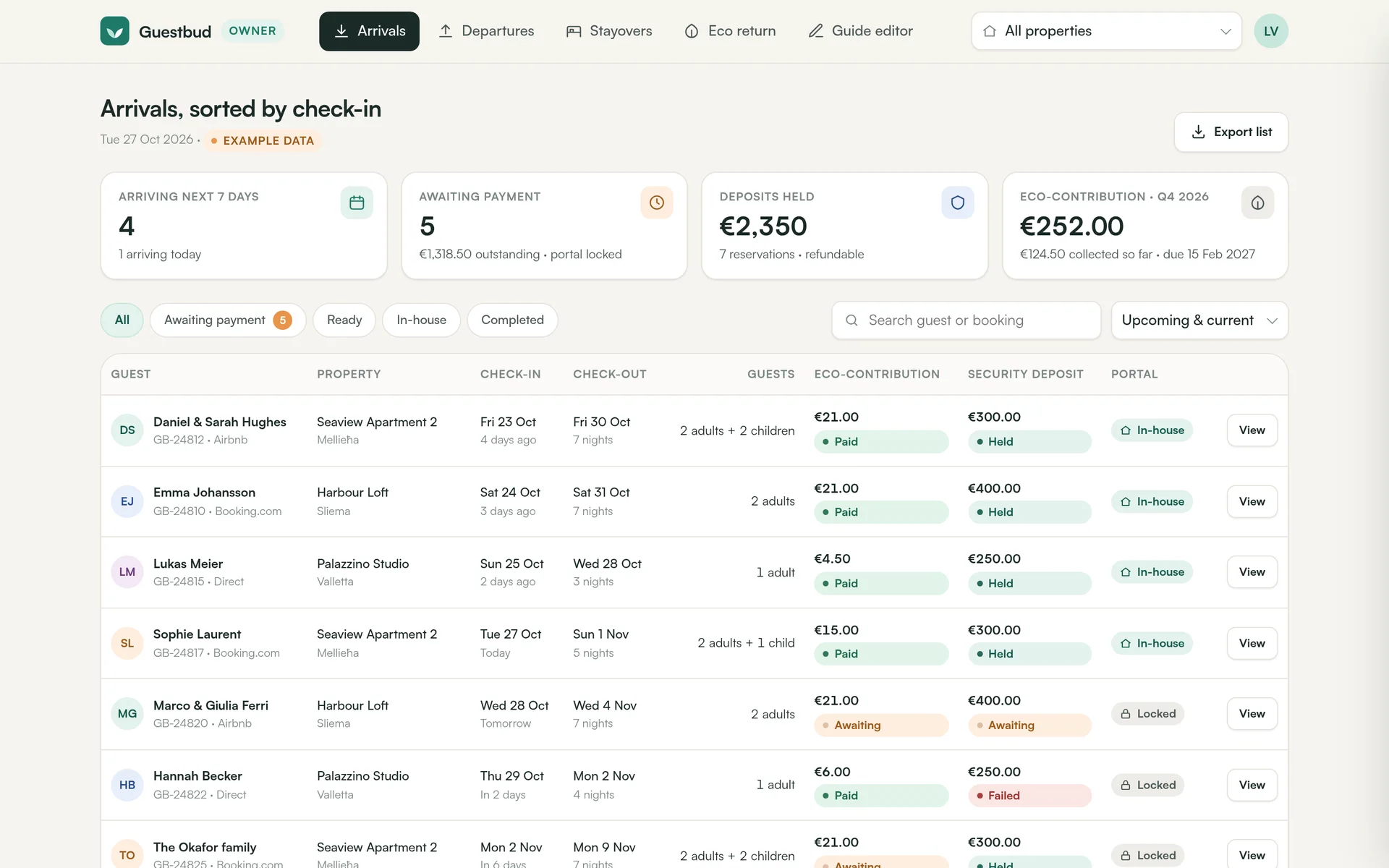
See who is arriving, who has paid what, and download the figures you need, without chasing guests or digging through inboxes.

guestbud.io/manage
Guestbud owner dashboard showing arrivals with eco tax and security deposit status for each reservation

Easy-to-understand statements

Each reservation shows the eco tax and the deposit separately: paid, pending, waived or released, with the amount collected.

Downloads in MTA format

Export the eco-contribution lines for a quarter in the Malta Tourism Authority booking template, ready for submission.

Your PMS or channel manager

Bookings sync from Hostaway, RentalsUnited, Channex or any iCal feed, or you keep them in the built-in calendar.

Waive, update or change amounts

Adjust the eco tax or the deposit for a specific guest, waive it where appropriate, and manage payment and portal information together.

Open the owner dashboard demo Sample data · every amount and guest is an example

Features

Everything the arrival needs, nothing it doesn't

Eco-tax collection

Collect Malta's environmental contribution from each guest before arrival, with a clear explanation of what it is and who sets it. Rates are shown per adult per night with the cap. Other countries and towns get their own tourist-tax rules.

Refundable security deposit

Handled separately from the tourist tax, as a card pre-authorisation or a payment refunded after check-out, and described as refundable according to the property's stated terms.

Two separate flows

Eco tax and deposit each have their own payment step, status and receipt.

Revolut integration

Guests pay by card, Revolut Pay, Apple Pay or Google Pay into your own Revolut account. Card details are handled by Revolut, never stored by Guestbud.

Access-code release

Door and building codes appear once the required check-in and payment steps are complete, including any waivers you approve. Nuki keypad codes are created automatically.

Guest information portal

Reservation, arrival steps, Wi-Fi, rubbish days and about-the-area tips, written for a phone and installable on the home screen.

Upsells and extras

Offer hampers and other stay extras in the portal; you choose what's bookable.

Statements and reporting

Per-reservation statements and quarterly eco-tax downloads in MTA format.

Online check-in

Guest details, ID document, co-travellers and signature, or in seconds with the EU Digital Identity Wallet. German Meldeschein included.

AI phone assistant

An AI answers guest calls in their language, files problems as issue reports and can call guests before arrival when check-in or the tourist tax is still open. How it works

Owner controls

Waive, update or change the eco tax and deposit for a guest, release or retain a deposit after check-out, and edit the guest guide for each property from one dashboard.

See every feature · Read the manuals · REST API

Pricing

One price. Per listing, per month.

Every listing on Guestbud gets the guest portal, online check-in, both payment steps, access-code release and the owner dashboard. Create your account in two minutes, or talk to us about your portfolio. Pricing details and key facts

Guestbud

€10per listing per month

  • Personal guest portal per reservation
  • Online check-in, including the EU Digital Identity Wallet
  • Tourist tax and refundable deposits handled separately
  • Revolut checkout into your own account
  • Access codes released after check-in and payment
  • Stay information, area tips and extras, installable on the phone
  • Owner dashboard, statements and MTA-format downloads

No check-ins that month? No listing fee. Excl. VAT · monthly, cancel any time · all terms

FAQ

Questions owners ask us

Something missing? Ask us a question and we'll reply by email.

What is Guestbud?

Guestbud is a guest portal and payment platform for short-term rental owners and managers. It collects the required guest payments before arrival, runs the online check-in and gives guests one place for their stay information, access details and optional extras.

How do the eco-tax and security-deposit payments work?

The guest opens their personal portal and sees the check-in and the payment steps. They pay the eco tax first, then the refundable security deposit, each through Revolut checkout, Apple Pay or Google Pay. Every step gets its own receipt, and you see the status of each in your dashboard. You can also mark a step as paid in cash or waive it.

Are the eco tax and the deposit separate payments?

Yes. They are always separate payment steps and never combined into one amount. The eco tax is charged. The deposit is either a card hold (pre-authorisation: the amount is reserved but not charged, then released or partly captured after check-out) or a payment that is refunded after check-out — you choose per property.

Who is responsible if a tax or deposit is not collected?

You are. Guestbud is a tool: it asks guests for the tax and the deposit and records what happened, but the host stays responsible for collecting the right amounts, checking regularly — in the dashboard and in their own Revolut account — that every tax and deposit was actually collected, and declaring and paying taxes to the authority. Aloaha Limited takes no financial responsibility for uncollected or incorrect amounts — see your responsibility in the terms of service.

When can guests see their access details?

Access codes and arrival steps appear once the online check-in is complete and every payment step is settled: paid, held on the card, marked as paid in cash, or waived by the host. A step with a zero amount (for example no deposit for the property) is not required. Until then the guest sees their reservation summary and the open steps. The door codes themselves unlock at the listing’s check-in time: until then the guest sees a live countdown, and the host can unlock them early for a single reservation (for example an early check-in).

Can I connect my own AI agent to Guestbud?

Yes. Guestbud has a built-in MCP (Model Context Protocol) server. Connect ChatGPT, Claude, Cursor or n8n — with your Guestbud sign-in or an API key: your agent answers guests in the Airbnb and Booking.com chat, follows up check-ins, edits listings and guest emails — with exactly the permissions of the key’s role, and never with access to refunds or payment settings.

Can an AI answer my guests’ phone calls?

Yes. The AI phone assistant connects a voice AI on your own number (CodeB Voice AI on phone.codeb.io) to your bookings: it recognises the caller’s booking, answers in their language, sends the portal link, gives door codes only after strict checks, files problems as issue reports and takes messages. Optionally it calls guests before arrival when the online check-in or the tourist tax is still open. Every call ends with a short summary in the booking.

Does Guestbud work with Nuki smart locks?

Yes. Connect your Nuki account once and every paid stay gets its own 6-digit keypad code on your Nuki Smart Lock, valid from check-in to check-out and deleted automatically afterwards. See Nuki smart locks.

Can guests open the door with their phone?

With compatible door readers, yes — on request. CodeB Wallet turns an Android phone with NFC into the access card (iPhone support is coming very soon): a secure PKOC access card, or an NFC memory card in read-only or writable mode for simple readers. It depends on your hardware, so contact us first; details on phone door access cards and on myeudi.app.

Is the security deposit refundable?

The security deposit is refundable according to the property's stated terms, which are shown to the guest before they pay. The owner or manager decides whether to release it in full or retain part of it after check-out; Guestbud records that decision and shows it to both sides. Guestbud itself does not guarantee a refund.

What can guests find in their portal?

Their reservation and arrival details, property access codes and how to get in, Wi-Fi information, rubbish and recycling days, about-the-area tips from the host, and a section for hampers and other optional extras.

Do guests need to install an app?

No. The portal is a web page that works on any phone. Guests can add it to their home screen on iPhone or Android, where it opens like an app and still shows the last saved information with a weak signal.

Is the EU Digital Identity Wallet supported?

Yes, as an optional way to fill in the identity part of the check-in. The request goes through phone.codeb.io (see the CodeB Wallet – EU Digital Identity Wallet at myeudi.app) using OpenID for Verifiable Presentations; the wallet shares the person identification data (PID) as SD-JWT VC or mdoc, and name, date of birth and nationality are marked as verified. National wallets are still being rolled out, so many guests do not have one yet; they simply use the normal form.

Do you use cookies or tracking?

The public website and the guest portal set no cookies and use no advertising or analytics trackers — so there is no cookie banner. Signing in to the owner dashboard uses necessary security cookies only. Fonts and icons come from our own servers; payments use Revolut's checkout. Details in the privacy policy.

Can guests buy hampers or extras?

Yes. You decide which extras to offer for each property, for example a welcome hamper, breakfast hamper or beach kit. Guests browse and order them in the same portal.

What does Guestbud cost?

€10 per listing per month, excluding VAT. It is billed monthly with no minimum term and you can cancel any time; only listings with at least one stay checking in that month are billed. Setup, a custom domain and email support are included. Revolut charges its standard merchant fees on your own account; there is no extra payment fee from Guestbud.

Can Guestbud connect with my PMS?

Bookings can be synced from Hostaway, RentalsUnited, Channex or any iCal feed, and other systems can push bookings through the REST API. Tell us which PMS you use and we'll confirm what's possible before you commit.

Contact

Talk to Guestbud

Tell us a little about your listings and we'll come back to you by email within one working day. Prefer to chat? WhatsApp works too.

I'd like to
We use your details only to answer you. Privacy policy

Give guests a smoother arrival. Keep the important details in one place.