Integration · Nuki
Automatic Nuki keypad codes for every stay
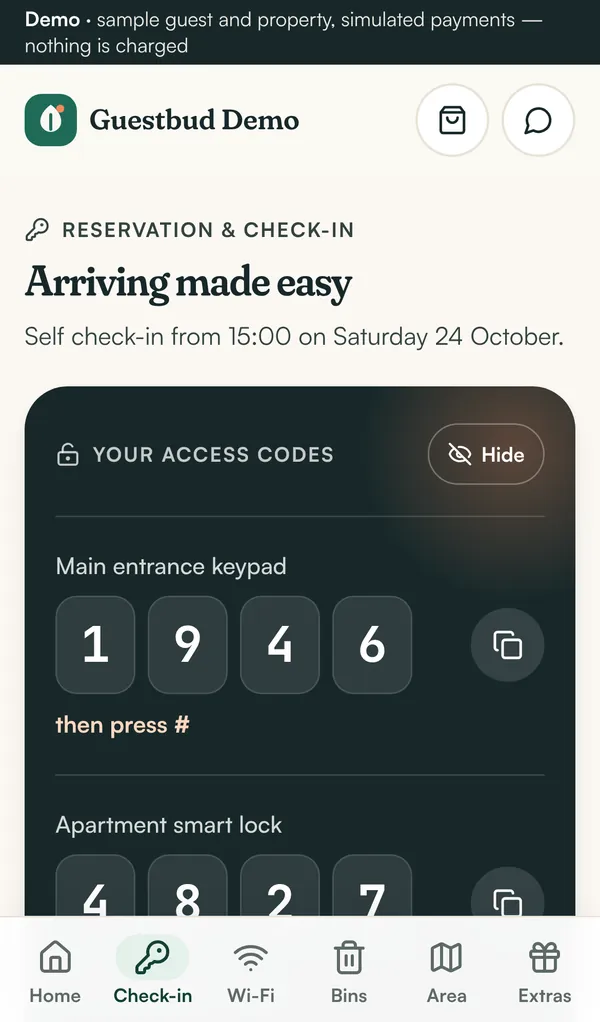
With a Nuki Smart Lock and Nuki Keypad, Guestbud creates a personal 6-digit code for each guest through the Nuki Web API — only after the online check-in and the payments are done — and deletes it automatically after the stay. No key handover, no shared codes that circulate for months.
How it works
- A booking arrives from your channel manager or PMS, or you enter it by hand
- When the guest has checked in online and every payment is settled, Guestbud creates a code on the lock — at most the set number of days before arrival (at least 2, so the lock can sync)
- The code is valid from check-in to check-out, with optional extra hours on both sides
- The guest sees the code in the guest portal — from the time you choose: right after payment, on the arrival day or at the check-in time
- After check-out, or when the booking is cancelled, the code is deleted automatically
Codes Nuki accepts
Every code has 6 digits from 1 to 9 (the Nuki keypad has no 0) and never starts with 12, as Nuki requires. If the lock or Nuki is unreachable, Guestbud tries again every hour and shows the last error on the booking.
Full control per booking
Each booking shows the code, its validity and its status (not set yet, active, removed). Create the code early for an early arrival, or remove it at once. When the dates of a stay change, the code follows the new dates.
Set up in minutes
Generate a Nuki Web API token in Nuki Web, paste it under Settings → Smart locks, choose the lead time and extra hours, and assign one lock to each property. The token is stored encrypted; codes are only created once you switch automatic codes on.
Nuki integration at a glance
| Hardware | Nuki Smart Lock with Nuki Keypad, activated in Nuki Web |
|---|---|
| Connection | Nuki Web API token, stored encrypted per account |
| When a code is created | Only after online check-in and payments, at most the set number of days before arrival (minimum 2) |
| Code validity | From check-in to check-out, plus optional extra hours |
| When the guest sees it | Right after payment, on the arrival day from a set time, or at the check-in time — your choice |
| After the stay | Deleted automatically after check-out or cancellation |
| Code format | 6 digits from 1 to 9, never starting with 12 |
| Locks per property | One Nuki lock per property; fixed codes (e.g. the building door) stay in the listing |
| Other locks | Door codes for other systems can be entered by hand; phone door cards for PKOC and NFC readers are available on request |
Frequently asked questions
Does Guestbud work with Nuki?
Yes. Guestbud connects to your Nuki account through the Nuki Web API and creates a personal keypad code for each stay on your Nuki Smart Lock with Nuki Keypad.
Can a guest get the code before paying?
No. The code is only created after the online check-in and every payment step are done, and the guest sees it only from the time you choose.
When is the code deleted?
Automatically after check-out (plus the extra hours you set) and immediately when the booking is cancelled.
What happens if the lock is offline?
Guestbud retries every hour and shows the last error on the booking, so you can create the code by hand or give the guest another way in.
What if the booking dates change?
The code follows the new dates; you can also renew it on the booking with one click.
Do I need a Nuki Keypad?
Yes. Guests type the code on the Nuki Keypad, so the lock needs a keypad and must be activated in Nuki Web.
Read the manuals
- Nuki smart locks — automatic door codesConnect Nuki: every paid stay gets its own keypad code, valid from check-in to check-out, shown in the guest portal and removed after the stay.
- The guest experienceWhat guests see: online check-in, tourist tax and deposit payments, then door codes, Wi-Fi, rubbish days, local tips and extras — installable on the phone.
- Security and privacySeparate data per host, encrypted secrets, no card data, private ID documents, automatic deletion, EUDI Wallet with consent, GDPR erasure and audit trail.
Reviewed 27 October 2026 by the Guestbud team, Aloaha Limited.